Best Personal Finance Apps for Managing Your Money

image for illustrative purposes only.
Why You Need a Dedicated Money Management App Today
If you have ever checked your checking account balance at the end of the month and wondered where all your hard-earned dollars went, you are not alone. Traditional methods like paper logs or manual Excel spreadsheets require intense manual input. The moment life gets busy, manual tracking stops, leaving you back at square one.
Personal finance software bridges this gap through automation and intelligent insights. By integrating secure data connections with your financial institutions, these tools offer several distinct advantages:
- Automated Expense Tracking: Transactions are categorized instantly as soon as they clear your debit or credit card, saving hours of manual data entry.
- Real-Time Cash Flow Visibility: Know exactly how much disposable cash you have remaining before your next payday.
- Subscription Detection: Identify recurring monthly charges and unused gym or streaming services quietly draining your accounts.
- Integrated Goal Tracking: Establish automated rules for emergency funds, vacation savings, or home down payments.
- Comprehensive Net Worth Monitoring: Track bank balances alongside home equity, auto loans, mortgages, and investment portfolios in one centralized dashboard.
8 Best Personal Finance Apps for Managing Your Money
Below is a detailed breakdown of the premier financial management platforms currently on the market, categorized by their primary strengths and optimal user profiles.
1. You Need a Budget (YNAB): Best Overall for Zero-Based Budgeting


Overview: You Need a Budget (YNAB) remains one of the most respected names in the financial software industry. Built specifically around the zero-based budgeting framework, YNAB requires users to “give every dollar a job” before it gets spent.
Unlike traditional apps that simply show where you spent money in the past, YNAB forces you to proactively plan how you will allocate cash you currently own. The software operates on four core principles: assign every dollar a job, embrace your true expenses (planning for non-monthly bills), roll with the punches (flexibly adjusting categories when overspending occurs), and age your money (working toward paying this month’s expenses with last month’s income).
Key Features:
- Direct bank syncing across thousands of financial institutions.
- Real-time syncing between phone, tablet, and desktop web applications.
- Goal-tracking tools with visual progress bars.
- Extensive educational resources, including free daily live workshops.
- YNAB Together feature, allowing up to five users to share one subscription under separate profiles.
Best For: Individuals or couples dedicated to changing their spending behavior, paying down high-interest debt, or eliminating the paycheck-to-paycheck cycle completely.
Pricing: Offers a robust 34-day free trial. Following the trial, subscription pricing is $14.99 per month or $109 per year when billed annually.
2. Empower (Formerly Personal Capital): Best Free App for Net Worth & Portfolio Tracking


Overview: If your primary goal is tracking long-term wealth, monitoring investments, and evaluating retirement readiness rather than granular daily envelope budgeting, Empower is an outstanding choice. It remains one of the most comprehensive free tools available for wealth management.
Empower aggregates your total financial life on a single screen. Once you connect your checking, savings, credit cards, mortgages, student loans, 401(k)s, IRAs, and taxable brokerage accounts, the app calculates your true net worth automatically. Its sophisticated analytics tools dive deep into investment fee analysis, asset allocation, and retirement forecasting.
Key Features:
- Comprehensive net worth dashboard updating in real time.
- Investment Checkup tool to evaluate asset weighting and portfolio risk exposure.
- Fee Analyzer tool that reveals hidden 401(k) and mutual fund management fees.
- Retirement Planner simulator to model dynamic scenario outcomes.
- Basic cash flow and monthly expense tracking.
Best For: Investors, high earners, and individuals aiming to track net worth, optimize portfolio allocations, and plan for retirement without paying subscription fees.
Pricing: Free to use for financial aggregation and tools. Empower earns revenue by offering optional wealth management services for users with significant investable assets.
3. Quicken Simplifi: Best for User-Friendly Spending Plans and Cash Flow


Overview: Designed by Quicken, a veteran in the money management space, Quicken Simplifi provides a modern, clean, and intuitive approach to tracking day-to-day money flow. It strikes an ideal balance between deep technical insights and effortless navigation.
Instead of rigid traditional budgets, Simplifi uses a dynamic “Spending Plan.” This feature automatically factors in your recurring income, fixed bills, and savings goals to show you exactly how much spendable income you have left for non-essential purchases throughout the month.
Key Features:
- Customizable dashboard with clean visual charts and breakdown graphs.
- Automated detection of recurring bills, subscriptions, and income streams.
- Real-time alerts when spending approaches preset custom limits.
- Savings spaces designed to bucket cash for short-term and long-term targets.
- Customizable reporting features to analyze spending habits by merchant or category.
Best For: Beginners who want a clear, forward-looking view of their spendable income without the steep learning curve of zero-based budgeting platforms.
Pricing: Typically priced around $3.49 to $6.99 per month (billed annually), with frequent introductory discounts and a 30-day money-back guarantee.
4. Monarch Money: Best Premium All-in-One Dashboard for Households and Couples


Overview: Monarch Money has quickly risen to prominence as a top-tier modern money platform designed to replace legacy tools. It offers an ad-free, sleek user experience focused on customizable management for both individuals and households.
Monarch allows you to customize almost every aspect of your dashboard, including transaction rules, budget structures (flexible categories vs. strict limits), net worth tracking, and investment views. Crucially, Monarch excels at partner collaboration, enabling couples to manage household finances together without paying for two separate accounts.
Key Features:
- Multi-institution sync engine utilizing Plaid, Finicity, and MX for maximum connection stability.
- Joint partner access at no additional cost with customized permissions.
- Advanced custom rules to automatically rename and categorize complex transactions.
- Financial advisor access options to collaborate with professionals directly inside the app.
- Comprehensive cash flow and goal projection modeling.
Best For: Couples, families, and users wanting a modern, highly customizable all-in-one financial hub with zero ads or product upselling.
Pricing: Offers a 7-day free trial, then $14.99 per month or $99.99 annually.
5. Rocket Money: Best for Subscription Management and Bill Negotiation


Overview: Rocket Money (formerly Truebill) focuses heavily on helping users identify leaks in their monthly cash flow. If you suspect you are losing money to forgotten subscriptions, creeping utility rates, or unexpected bank fees, Rocket Money is built to solve those exact problems.
The app quickly analyzes linked financial accounts to pinpoint recurring charges. From there, it allows you to cancel unwanted subscriptions with a few taps. Additionally, Rocket Money offers a concierge service that actively negotiates lower monthly bills (such as cable, internet, or phone plans) on your behalf.
Key Features:
- Instant identification and centralized management of recurring subscriptions.
- In-app subscription cancellation services.
- Bill negotiation services for lower rates on recurring services.
- Automated savings accounts with customizable smart-deposit logic.
- Credit score monitoring and credit profile breakdown reports.
Best For: People who want to instantly cut unnecessary monthly expenses and streamline bill tracking without spending hours on the phone with customer service.
Pricing: Free basic tier available. The Premium tier uses a “pay what you think is fair” sliding scale ranging from $6.00 to $12.00 per month. Bill negotiation services charge a percentage fee of the total first-year savings realized.
6. PocketGuard: Best App for Overspenders Needing Strict Boundaries


Overview: If your biggest financial struggle is overspending before bills are covered, PocketGuard offers a direct solution. The app’s entire philosophy centers around answering one fundamental question: “How much pocket money do I actually have right now?”
PocketGuard calculates your “In My Pocket” number by taking your total income and subtracting upcoming bills, loan payments, and savings allocations. The remaining number is what you can safely spend without risking missed payments or overdrafts.
Key Features:
- Simple “In My Pocket” spending metric displayed prominently on launch.
- Automated debt payoff planning tools using avalanche or snowball methods.
- Customizable transaction rules and spending categories.
- Anti-overspending alerts when approaching category thresholds.
Best For: Individuals who struggle with impulse spending and want a straightforward guardrail preventing them from dipping into money reserved for bills.
Pricing: Free basic version available. PocketGuard Plus costs $12.99 per month or $74.99 annually.
7. Goodbudget: Best for Envelope Budgeting Without Automatic Bank Syncing


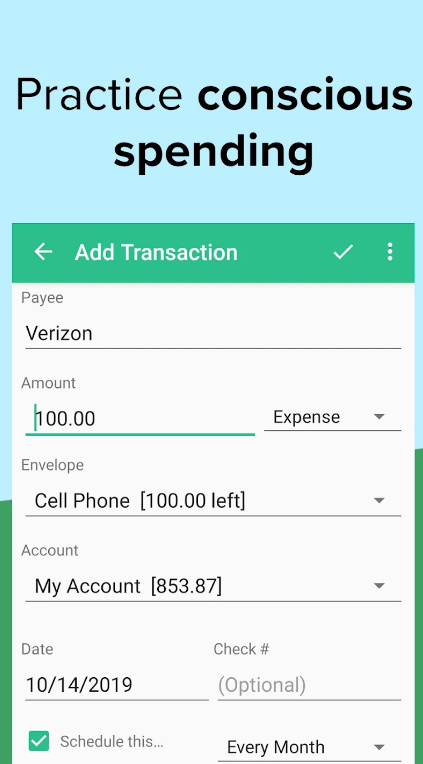
Overview: Goodbudget brings the time-tested “envelope system” into the digital age. Traditionally, envelope budgeting involves placing physical cash into paper envelopes dedicated to groceries, rent, entertainment, and gas. Once an envelope is empty, spending in that category stops until next month.
Goodbudget operates on this exact framework virtually. Unlike most modern competitors, Goodbudget does not require you to link your bank accounts. Instead, you manually enter your income and log purchases, keeping you intimately connected to every dollar flowing through your hands.
Key Features:
- Virtual envelope system for clear category allocation.
- Manual transaction tracking for enhanced spending awareness.
- Multi-device synchronization to keep partners on the same page.
- Detailed reports analyzing envelope spending patterns over time.
Best For: Privacy-conscious individuals who prefer not to link bank credentials online, as well as hands-on budgeters who benefit from manual logging.
Pricing: Free tier includes 10 regular envelopes and 10 extra envelopes across 2 devices. The Plus plan costs $10.00 per month or $80.00 per year for unlimited envelopes and up to 5 devices.
8. Honeydue: Best Free Financial App Designed Exclusively for Couples


Overview: Managing finances as a couple can often lead to miscommunication. Honeydue addresses this challenge by providing a joint platform where partners can track accounts, coordinate bill payments, and discuss spending together in a single shared environment.
Honeydue allows couples to select exactly how much detail they share with one another. You can choose to show full account balances and individual transactions, or simply share high-level totals while keeping transaction details private.
Key Features:
- Customizable privacy settings per connected account.
- Joint bill reminders and payment status tracking.
- In-app messaging to comment on specific transactions or celebrate savings wins.
- Support for over 20,000 banking institutions worldwide.
- Automated categorization of joint household expenses.
Best For: Dating, engaged, or married couples looking to build financial transparency and manage shared household goals collaboratively.
Pricing: 100% free to use on iOS and Android devices.
Comparison of Top Personal Finance Apps
To help you quickly evaluate your options, the table below compares the primary features, pricing models, and target audiences of our top recommended platforms:
| App Name | Primary Focus | Bank Syncing | Starting Price | Best Feature |
|---|---|---|---|---|
| YNAB | Zero-Based Budgeting | Automatic | $14.99/mo ($109/yr) | Proactive behavioral budget change |
| Empower | Net Worth & Investing | Automatic | Free | Investment Fee Analyzer & portfolio checkup |
| Quicken Simplifi | Cash Flow Management | Automatic | $3.49/mo (billed annually) | Dynamic real-time Spending Plan |
| Monarch Money | All-in-One Household Hub | Automatic | $14.99/mo ($99.99/yr) | Highly customizable, shared partner dashboards |
| Rocket Money | Subscription Control | Automatic | Free (Paid $6–$12/mo) | Concierge bill negotiation & quick cancellations |
| PocketGuard | Overspending Control | Automatic | Free (Paid $12.99/mo) | “In My Pocket” spendable metric |
| Goodbudget | Envelope Budgeting | Manual | Free (Paid $10/mo) | Hands-on manual transaction logging |
| Honeydue | Couple’s Finance | Automatic | Free | Custom privacy controls for shared management |
How to Choose the Right Money Management Tool for Your Needs
Selecting the best personal finance software depends entirely on your personal goals, technical preferences, and financial habits. Here is a quick step-by-step framework to guide your decision:
Step 1: Identify Your Primary Financial Goal
Before downloading an app, determine what problem you are trying to solve:
- If you live paycheck to paycheck: Choose a structured zero-based tool like YNAB.
- If you want to track retirement and investments: Choose a net-worth aggregator like Empower.
- If you want a simple view of daily spendable cash: Choose Quicken Simplifi or PocketGuard.
- If you are managing money alongside a partner: Choose Monarch Money or Honeydue.
Step 2: Decide Between Automated Syncing vs. Manual Entry
Automated bank syncing saves time and ensures transactions are never missed. However, if data privacy is your top concern, or if manually writing down expenses helps you stay disciplined, manual platforms like Goodbudget offer a safer, more intentional alternative.
Step 3: Evaluate Free vs. Subscription Paid Options
Free apps are fantastic for budget-conscious users, but they often sustain themselves through targeted financial product ads (like credit card or loan offers). Paid apps typically charge a monthly or annual fee in exchange for an ad-free interface, advanced customization, and premium data security. Test free trials before committing to an annual plan.
Security and Privacy: Are Financial Apps Safe to Use?

Connecting your bank account credentials to a third-party app understandably raises security questions. Luckily, modern financial applications adhere to standard banking security regulations to safeguard your sensitive data.
Here are the key safety standards implemented by top-tier financial platforms:
- Bank-Grade Encryption: Reputable apps utilize 256-bit SSL/TLS encryption—the exact same cryptographic standard used by major retail banks to protect data in transit and at rest.
- Third-Party Aggregators: Apps rarely store your banking usernames or passwords directly on their servers. Instead, they use secure financial data networks like Plaid, Finicity, or MX. These services provide read-only access via encrypted tokens.
- Read-Only Access: Financial budgeting apps possess read-only permissions. This means that even in the unlikely event of an app compromise, unauthorized parties cannot move, transfer, or withdraw money from your bank accounts.
- Multi-Factor Authentication (MFA): Leading apps support biometrics (Face ID/Touch ID) alongside two-factor authentication codes to prevent unauthorized access to your mobile device.
Practical Tips to Get the Most Out of Your Personal Finance App
Downloading an app is only the first step; building long-term habits is what creates financial security. Follow these proven strategies to get maximum value from your software:
- Schedule a Weekly Financial Check-In: Set aside 10 to 15 minutes every Sunday to review unassigned transactions, adjust overspent categories, and clear pending alerts.
- Customize Your Expense Categories: Default categories like “General Shopping” are often too broad. Tailor categories to your actual lifestyle—such as “Coffee Shops,” “Pet Care,” or “Hobbies”—so you can spot meaningful trends.
- Build an Emergency Fund Envelope First: Prioritize populating a high-yield savings account target inside your app before ramping up non-essential lifestyle spending.
- Review Subscription Lists Quarterly: Check your recurring charges list every three months to prune unused memberships and prevent recurring billing creep.
- Don’t Panic Over Minor Overspending: Budgeting is a dynamic exercise. If you overspend in one category, simply transfer funds from a lower-priority category to balance your monthly numbers.